微博评论数据怎么采集和整理?从帖子链接到评论分析表
从帖子清单、评论采集、字段核对到主题与情绪分析,附字段表、常见报错和合规提示。
一、微博评论数据能用来做什么
评论比转发更接近真实反馈:用户会在这里讲具体问题、表达态度、补充信息。常见用途有三类:舆情反馈(某条博文下的真实声音)、内容复盘(哪类表达引发讨论)、用户研究(评论者的关注点和语言习惯)。
二、准备帖子清单
- 按关键词、博主主页或单条博文链接收集帖子,记录来源和采集日期。
- 确认博文公开可访问、评论区开放;删除或仅部分可见的博文会返回空结果。
- 按事件阶段分时间段采集,避免把不同时期的数据混在一起。
三、采集步骤
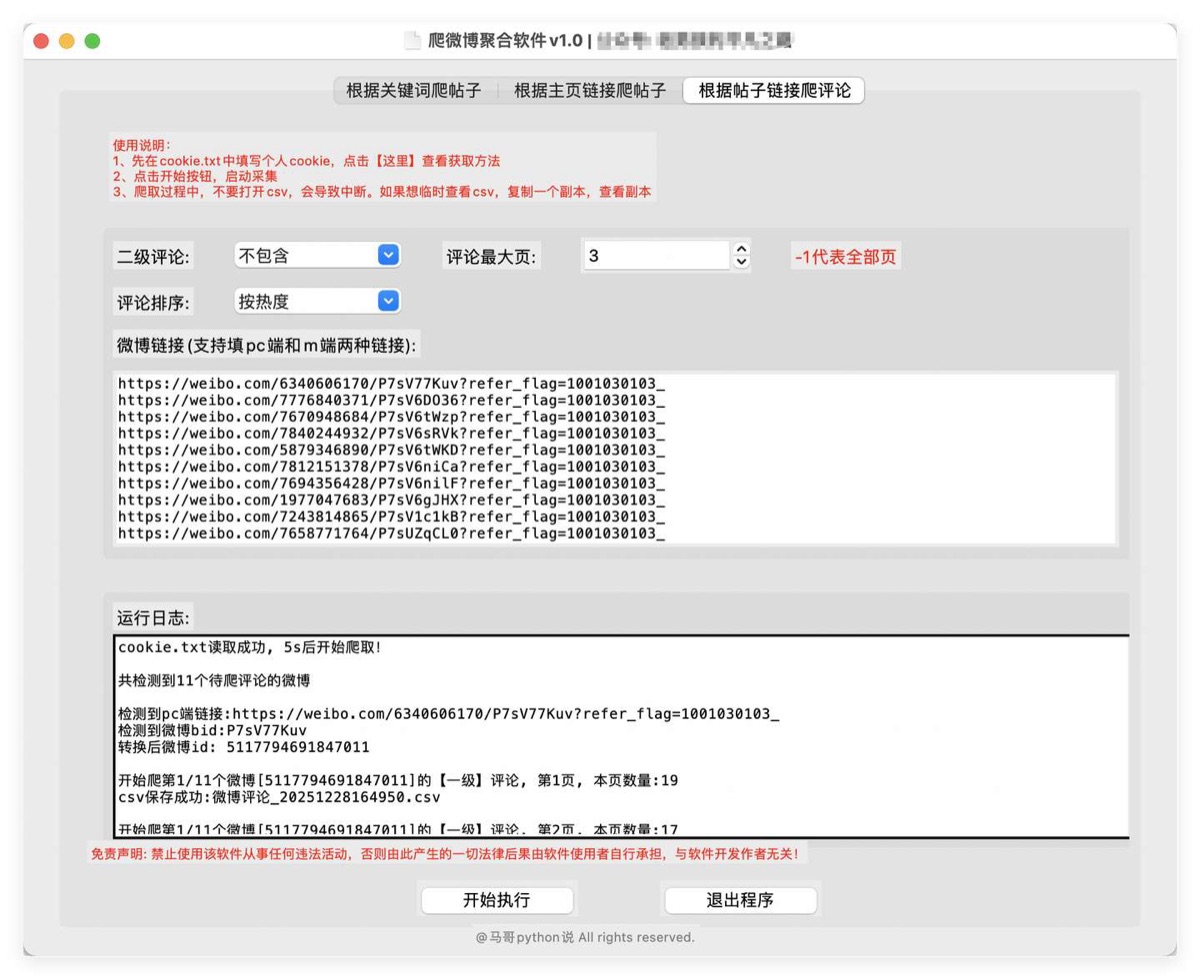
- 打开软件,选择评论采集。
- 粘贴博文链接,或先按关键词搜索博文。
- 设置页数和保存目录,开始执行。
- 结束后查看 CSV 和 logs 日志。
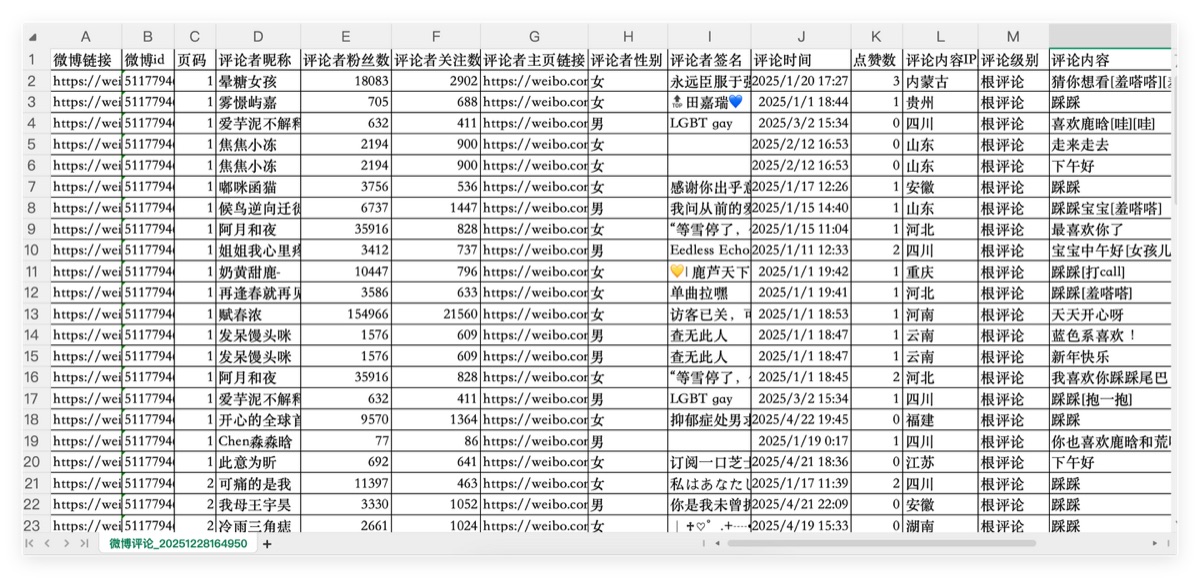
四、导出字段
| 字段 | 含义 | 用途 |
|---|---|---|
| 博文链接 | 评论所属博文 | 回溯来源 |
| 评论者昵称 / id | 用户标识 | 去重、画像 |
| 评论内容 | 评论文本 | 主题与情绪分析 |
| 评论时间 | 发布时间 | 趋势分析 |
| 点赞数 | 评论互动 | 热度参考 |
| 评论级别 | 一级评论或回复 | 区分主评论与回复 |
| IP 属地 | 评论者地域(如导出含) | 地域分布 |
字段齐全比条数重要;导出后先抽查 10 条,确认评论和博文对应。
五、导出后的检查与清洗
- 删除重复评论,保留原始备份。
- 检查空值、乱码、时间格式和字段错位。
- 标记广告、无关内容和明显的水军话术。
- 抽样打开原博文,核对评论上下文。
六、常见报错与排查
评论为空
评论区可能关闭、博文被删除或仅部分可见;先确认博文能正常打开。
数量比页面少
平台只返回部分可见评论,翻页深度和账号状态都会影响结果,以导出文件为准。
导出乱码
用 UTF-8 打开 CSV;Excel 双击乱码时改用「数据 → 从文本/CSV」导入。
登录失效
重新登录并刷新登录态,避免频繁切换账号。
七、合规提示
只处理公开可见的评论,控制采集频率,遵守平台规则和适用法律。评论可能包含个人信息和未经证实的说法,引用时保留原文链接,避免断章取义。
八、常见问题
能按博文链接采集吗?
可以,单条博文链接即可采集其公开评论。
能采二级评论吗?
以当前版本支持为准;导出后可用「评论级别」字段区分主评论和回复。
能直接看情绪吗?
导出的是原始文本,情绪需要另行标注或借助分析工具。
支持 Mac 吗?
支持 Windows 和 macOS。
九、样本够不够,怎么判断
不看总数,看是否覆盖主要博文、时间阶段和账号类型;如果只有大 V 评论,缺少普通用户,结论会偏。保留「未采用样本」清单,写明排除原因;样本不足时缩小结论范围,不要用少量数据外推整体。
最后提醒:评论分析的价值在原文和上下文,报告里附 2–3 条代表性评论,比只给情绪比例更可信。
十、主题与情绪怎么标
先做主题分类:产品体验、价格、售后、物流、竞品对比、无关内容;再标情绪:正向、中性、负向、反讽。每条评论只给一个主标签,避免多重标签导致统计失真。标注前先看 50 条样本,统一口径,再批量处理;不确定的放进「待复核」,不要硬标。
十一、三个常见误区
只看评论总数、不看博文和时间分布;把一条高赞评论当成整体态度;忽略水军和营销号。报告里应给出样本量、时间窗口和代表性原文,避免用单条评论下结论。
十二、一份可复用的检查清单
- 目标:舆情、复盘还是用户研究。
- 样本:博文链接、时间范围、评论层级。
- 字段:评论者、内容、时间、点赞、属地。
- 质量:去重、抽样、标记广告。
- 输出:主题分布、情绪比例、原文示例。
清单固定后,每次只改样本范围,结果才可横向对比。
另外,评论分析不要脱离博文:同一条评论在不同博文下的含义可能不同,报告里要带原文链接和上下文;如果是危机事件,按小时级更新,常规监测按天或周即可。样本少时,先补样本再下结论。
如果评论量很大,先按点赞或时间抽样,再决定是否全量分析;报告中保留原文链接,方便复核。样本不足时,不要硬下结论,先补样本;结论要留有余地。
← 返回技术博客微博评论数据怎么采集和整理?从帖子链接到评论分析表
从帖子清单、评论采集、字段核对到主题与情绪分析,附字段表、常见报错和合规提示。
1. What Weibo Comment Data Is For
Comments are closer to real feedback than reposts: users explain problems, express attitudes, and add context. Common uses include public-opinion review, content retrospectives, and user research.
2. Prepare the Post List
- Collect posts by keyword, profile, or individual URL, and record source and date.
- Confirm posts are public and comments are open.
- Collect by event stage to avoid mixing different periods.
3. Collection Steps
- Open the tool and choose comment collection.
- Paste a post URL or search by keyword first.
- Set pages and the output folder, then start.
- Check the CSV and logs when it finishes.
4. Fields to Keep
| Field | Meaning | Use |
|---|---|---|
| Post URL | Source post | Traceability |
| Commenter name / ID | User identifier | Deduplication, profiling |
| Comment text | The comment | Themes and sentiment |
| Comment time | Publish time | Trend analysis |
| Likes | Engagement | Heat reference |
| Comment level | Top-level or reply | Separate replies |
| IP location | Region, if exported | Regional distribution |
5. Check and Clean
- Remove duplicates and keep a raw backup.
- Check empty values, encoding, dates, and field alignment.
- Flag ads, irrelevant content, and coordinated phrasing.
- Review a sample against the original posts.
6. Common Errors
No comments
The comment section may be closed, the post deleted, or only partly visible.
Fewer comments than the page shows
Only part of the comment set may be exposed; trust the export.
Garbled CSV
Open it as UTF-8, or import it through Excel's From Text/CSV.
Login expires
Log in again and refresh the session.
7. Compliance
Only process public comments, keep request rates reasonable, and follow platform rules and applicable laws. Keep original links when quoting.
8. FAQ
Can I collect by post URL?
Yes, a single public post URL is enough.
Can I collect replies?
It depends on the current version; use the comment-level field to separate replies.
Does it analyze sentiment?
It exports raw text; sentiment requires separate tagging or tools.
Does it support macOS?
Yes, Windows and macOS builds are available.
9. Is the Sample Enough?
Check coverage across posts, dates, and account types, not just row count. Keep an excluded-records list and narrow the conclusion when the sample is thin.
For bulk collection, use the related tool to export CSV, then clean and analyze it.
View the Weibo tool →Follow the WeChat account 老男孩的平凡之路 for setup notes.
10. Tagging Themes and Sentiment
Classify themes first: product experience, price, after-sales, delivery, competitor comparison, irrelevant. Then tag sentiment: positive, neutral, negative, sarcasm. One primary tag per comment, calibrate on 50 samples, and park uncertain cases for review.
11. Three Common Mistakes
Looking only at total comments, treating one popular comment as the overall attitude, and ignoring coordinated accounts. Report sample size, time window, and representative quotes.
12. A Reusable Checklist
- Goal: public opinion, retrospective, or user research.
- Sample: post URLs, date range, comment level.
- Fields: commenter, text, time, likes, location.
- Quality: dedupe, spot-check, flag ads.
- Output: theme distribution, sentiment share, quotes.
Do not detach comments from their posts: the same sentence can mean different things under different posts. Include links and context, and update hourly during a crisis, daily or weekly otherwise.
For large volumes, sample by likes or time before deciding on a full analysis, and keep original links in the report.
← Back to the technical blog