快手评论数据怎么采集和整理?从作品链接到结构化表格
从确定选题、准备作品链接,到评论采集、字段核对、清洗分析与常见报错,附字段表和合规提示。
一、快手评论数据能用来做什么
快手评论常见三类用途:选题验证(观众在讨论什么)、舆情观察(某个话题或品牌的反馈)、线索整理(从评论区找潜在客户)。用途不同,作品范围、字段和分析方法都不一样,先定目标再动手。
二、准备作品清单
- 按关键词、博主主页或单条作品链接整理清单,记录来源和采集日期。
- 确认作品公开可访问、评论区开放;删除或仅粉丝可见的作品会直接导致结果为空。
- 控制单次数量,分批执行,避免一次拉太多导致中断。
三、采集步骤
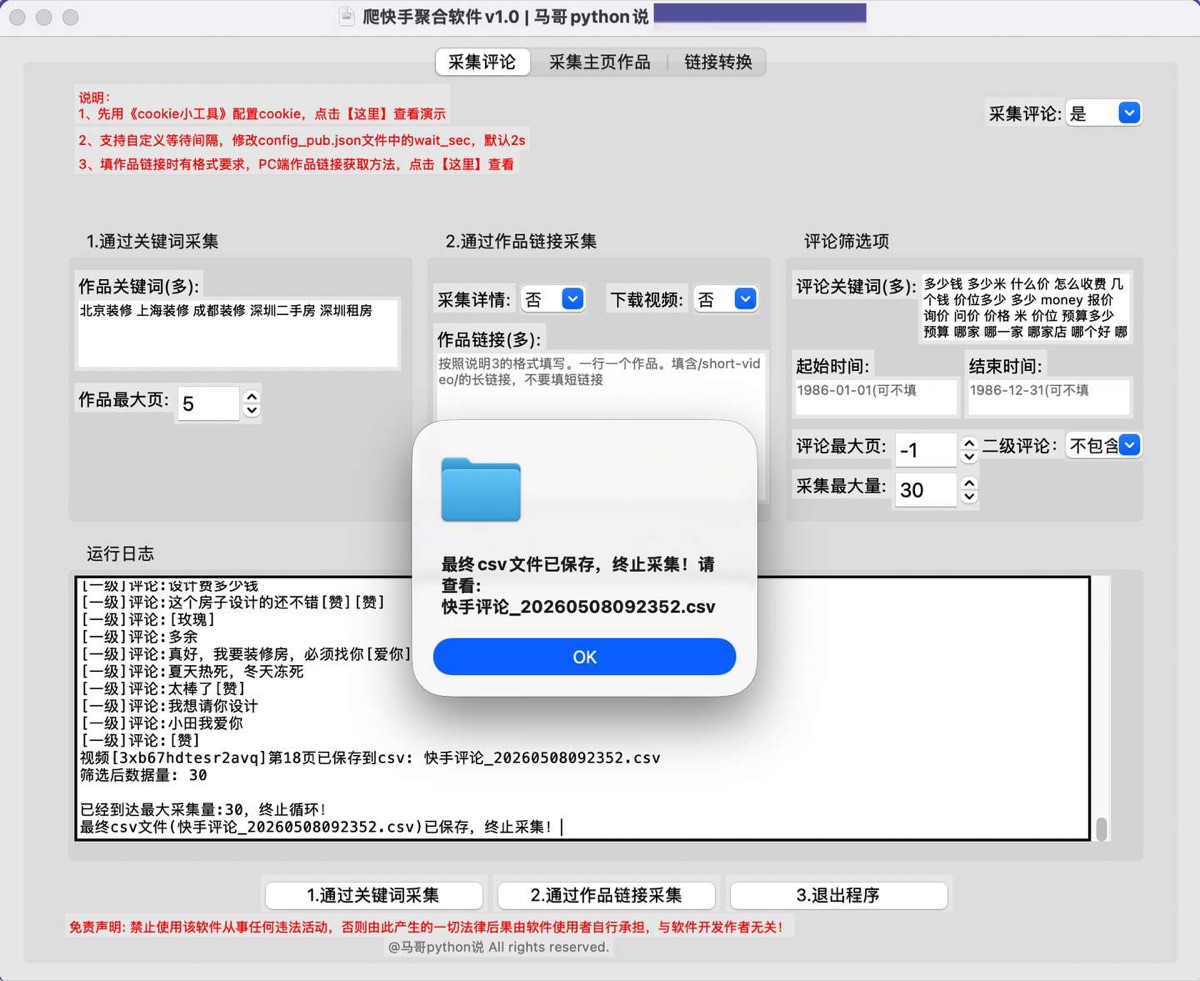
- 打开软件,选择「评论采集」。
- 粘贴作品链接,或输入关键词先搜索作品。
- 设置页数和保存目录,点击开始。
- 结束后查看 CSV 和 logs 日志。
采集过程中按页写入 CSV,中途中断时已完成页的数据通常还在。
四、导出字段
| 字段 | 含义 | 用途 |
|---|---|---|
| 作品链接 | 评论所属作品 | 回溯来源 |
| 评论者昵称 / id | 用户标识 | 去重、画像 |
| 评论内容 | 评论文本 | 主题与情绪分析 |
| 评论时间 | 发布时间 | 趋势分析 |
| 点赞数 | 评论互动 | 热度参考 |
| 评论级别 | 一级评论或回复 | 区分主评论与回复 |
| IP 属地 | 评论者地域(如导出含) | 地域分布 |
字段齐全比条数重要,导出后先抽查 10 条,确认评论和作品能对应。
五、导出后的检查与清洗
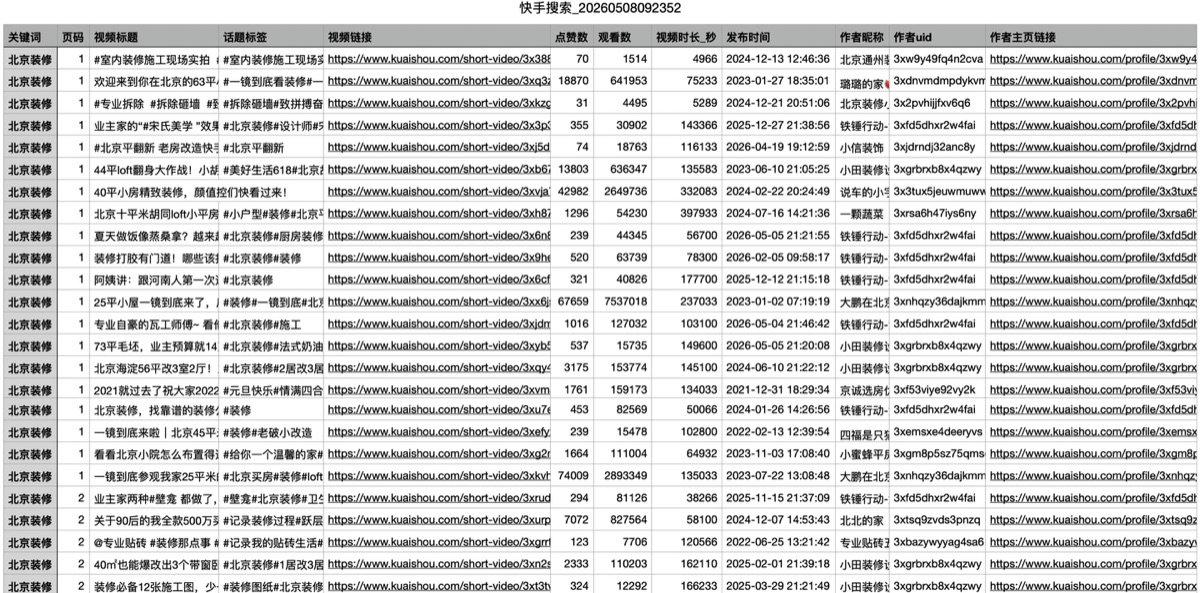
- 删除完全重复的评论,保留原始文件备份。
- 检查空值、乱码和时间格式。
- 按作品、时间或关键词筛选,标记无关内容。
- 抽样回到原作品核对上下文。
六、常见报错与排查
评论为空
确认作品是否还在、评论区是否关闭、链接是否为完整作品链接。
数量比页面少
平台通常只返回部分可见评论,翻页深度和账号状态都会影响结果,以导出文件为准。
视频下载失败
检查链接、网络和输出目录权限;单条失败通常不影响后续。
登录失效
重新登录并刷新登录态,避免频繁切换账号。
七、合规提示
只处理公开可见的数据,控制频率,遵守平台规则和适用法律。评论可能包含个人信息,分析时遵循最小必要原则。
八、常见问题
需要安装 Python 吗?
不需要,客户端已打包运行环境。
能采多少条评论?
受作品可见范围、账号状态和平台规则影响,没有固定上限。
中断会丢数据吗?
按页保存,已完成页通常保留。
支持 Mac 吗?
支持 Windows 和 macOS。
九、样本够不够,怎么判断
不看总数,看是否覆盖主要关键词、时间阶段和作品类型;如果某一类作品明显缺失,先补样本再分析。样本不足时,宁可缩小结论范围,也不要用少量数据外推整体;保留「未采用样本」清单,写明排除原因,方便复核。
最后提醒:评论数据只是原材料,结论要能回到原文和样本,不要用一条高赞评论代表整体。
十、把评论变成结论
先按作品和时间分组,找讨论量突然上升的节点;再按主题归类,比如「价格」「口感」「物流」「售后」,统计每类占比;最后抽取每类高赞评论人工复核,确认标签没有跑偏。结论要附原文示例,避免只给一个比例;跨平台对比时,先统一字段和清洗规则,再比较趋势。
十一、三个常见误区
只看条数、不看字段是否齐全;用一条高赞评论代表整体;忽略采集日期,把不同时间的数据混在一起。这三个问题都会让结论失真,建议在清洗阶段就把口径写清楚,并在报告里注明样本范围。
十二、一份可复用的检查清单
- 目标:这次要回答什么问题。
- 样本:作品清单、关键词、时间范围。
- 字段:作品、评论者、内容、时间、互动。
- 质量:去重、抽查、记录清洗规则。
- 输出:结论、原文示例、数据版本。
清单不用复杂,但每一项都要有人负责;下次复用同一份清单,数据才可比。
另外,评论数据要定期更新:同一批作品隔一周再采一次,比较主题和情绪变化,比单次快照更有价值;如果平台规则或账号状态变化,先记录再分析。报告里注明采集日期和样本范围,读者才知道结论的边界。
如果要做长期跟踪,建议固定同一批作品和字段,减少口径变化;报告里附 2–3 条代表性评论,结论更容易被理解。
← 返回技术博客快手评论数据怎么采集和整理?从作品链接到结构化表格
从确定选题、准备作品链接,到评论采集、字段核对、清洗分析与常见报错,附字段表和合规提示。
1. What Kuaishou Comment Data Is For
Comments support idea validation, public-opinion review, and lead discovery. Each goal needs a different video scope and field set, so define the goal first.
2. Prepare the Video List
- Collect videos by keyword, creator profile, or individual URL, and record the source and date.
- Confirm the videos are public and comments are open.
- Collect in batches to avoid interruptions.
3. Collection Steps
- Open the tool and choose comment collection.
- Paste a video URL or search by keyword.
- Set pages and the output folder, then start.
- Check the CSV and logs when it finishes.
4. Fields to Keep
| Field | Meaning | Use |
|---|---|---|
| Video URL | Source video | Traceability |
| Commenter name / ID | User identifier | Deduplication, profiling |
| Comment text | The comment | Themes and sentiment |
| Comment time | Publish time | Trend analysis |
| Likes | Engagement | Heat reference |
| Comment level | Top-level or reply | Separate replies |
| IP location | Region, if exported | Regional distribution |
5. Check and Clean
- Remove duplicates and keep a raw backup.
- Check empty values, encoding, and dates.
- Filter and flag irrelevant records.
- Review a sample against the original videos.
6. Common Errors
No comments
Confirm the video exists, comments are open, and the URL is complete.
Fewer comments than expected
Only part of the comment set may be visible; trust the export rather than the page count.
Video download fails
Check the link, network, and output folder permission.
Login expires
Log in again and refresh the session.
7. Compliance
Only process public data, keep request rates reasonable, and follow platform rules and applicable laws.
8. FAQ
Do I need Python?
No, the client bundles its runtime.
How many comments can I collect?
It depends on visibility, account status, and platform rules.
Will I lose data if it stops?
CSV is written page by page; completed pages usually remain.
Does it support macOS?
Yes, Windows and macOS builds are available.
9. Is the Sample Enough?
Check coverage across keywords, dates, and video types, not just row count. Keep an excluded-records list so the rules can be reviewed.
For bulk collection, use the related tool to export CSV, then clean and analyze it.
View the Kuaishou tool →Follow the WeChat account 老男孩的平凡之路 for setup notes.
10. From Comments to Conclusions
Group by video and date, find spikes, tag themes such as price, taste, delivery, and after-sales, then review top comments in each theme. Attach original examples and unify fields before cross-platform comparisons.
11. Three Common Mistakes
Counting rows without checking fields, letting one popular comment represent the whole audience, and mixing different dates. Document the rules and the sample scope.
12. A Reusable Checklist
- Goal: what question to answer.
- Sample: video list, keywords, date range.
- Fields: video, commenter, text, time, engagement.
- Quality: dedupe, spot-check, document cleaning rules.
- Output: conclusion, examples, data version.
Refresh the data regularly: collect the same videos a week later and compare themes and sentiment. Record the date and sample scope in the report.
For long-term tracking, keep the same videos and fields, and include two or three representative comments in the report.
← Back to the technical blog